

Gourd Alert (fictionalized while my actual app is still building up a tester base) is a .NET MAUI app that checks nearby farms for gourd availability and yells at you when the good pumpkins come in. Testing it needed a UAT backend, so testers could break things without touching production data. Apple and Google do not make that simple. App Store Connect and Google Play both expect you to promote the exact binary you tested, through TestFlight or an internal track, all the way to production. Build a separate app just to point it at a different backend, and you stop testing the artifact you are actually about to ship. What I needed was one MAUI binary, two backends, switchable without a rebuild.
This post covers how that switch works end to end: one binary carrying both configurations, a runtime-persisted selection instead of a build flag, environment-scoped local storage, a hidden way in for testers, and a default policy that only bends for TestFlight installs. That last part needed its own small side quest: a native Swift shim that asks iOS what StoreKit thinks the app’s distribution channel actually is, plus two bugs that only surfaced at the final link step.
One MAUI Binary, Two Backends, No Bootstrap Call
Both appsettings.UAT.json and appsettings.Production.json get embedded into every release build, not just one of them. Nothing in the compiled app decides which file wins at build time. That choice happens at runtime instead, made and persisted by SyntaxCircus.Maui.Environments, an open source package I built to carry this pattern across projects rather than hand-roll it inside Gourd Alert alone.
On first launch, the app defaults to Production. Every service that needs an API base URL, a public site URL, or a namespaced storage key resolves it live from the selector’s current environment key, not from IConfiguration. That distinction matters: IConfiguration only ever has one environment’s appsettings loaded into it at a time, so a service that captured a URL from it once would keep talking to the old backend even after a switch.
public string ApiBaseUrl =>
    _selector.CurrentKey == "uat" ? _uatBaseUrl : _productionBaseUrl;
I covered the release-pipeline half of this same problem, stamping a build number and choosing which appsettings file to embed, in Building One Publish Script for Two App Stores. That post picks the environment at build time through an MSBuild flag. This one picks it at runtime, after the build already shipped.
Namespacing Local State So One MAUI Binary Can Serve Two Backends Safely
A runtime switch is worthless if UAT and Production still share a database file or a token cache. Every piece of local state gets its own namespace per environment: access tokens, session data, cached API responses, feature-flag state, even analytics identity. A reasonable convention looks like this:
secure://app/{environment}/auth/refresh-token
preferences://app/{environment}/settings
app-data/{environment}/app.db
Namespace only the token and you have not solved the problem. A production token paired with a UAT database is still a data leak, just a quieter one. Gourd Alert also keeps both namespaces around after a switch instead of wiping the old one. Switch from UAT back to Production and back again, and your UAT session is still there, waiting, exactly as you left it.
A Switch Coordinator, Not a Restart
MAUI has no cross-platform “restart the app” API, and iOS actively discourages self-termination anyway. So a switch does not restart anything. It disposes the current environment’s live state (API clients, auth services, open connections), rebuilds a fresh service scope, and re-runs the same bootstrap sequence the app uses on a cold start.
The new environment selection only gets persisted after that callback succeeds. A failed switch should never leave you stuck in a half-configured state, silently pointed at a backend you never actually finished switching to.
Some SDKs Don’t Get the Memo
That re-bootstrap covers everything the coordinator actually owns: services registered in the DI container get disposed and rebuilt with the new environment’s configuration. It does not cover third-party SDKs that read their configuration once at process start and hold onto it for the life of the process. Sentry’s DSN and RevenueCat’s iOS and Android API keys are the two that bit me. Both initialize early, outside the coordinator’s reach, and neither exposes a supported way to swap that configuration on a live process. Switch environments and, without a real restart, Sentry keeps reporting crashes to whichever DSN it started with and RevenueCat keeps validating receipts against whichever key it started with, silently, no error, no stale-data banner, just the wrong destination.
For those cases there is no way around an actual restart, and iOS will not let the app trigger one on its own. Apple’s review guidelines treat programmatic self-termination as something to avoid, not a supported app lifecycle event, so unlike the rest of the switch, this part cannot happen invisibly. The fallback is a prompt: when a pending switch touches one of these SDK-owned settings, the confirmation screen tells the tester the app needs to be manually closed and reopened for it to fully take effect, instead of claiming a clean switch it cannot actually deliver. Better an extra tap than a tester filing a bug against the wrong environment’s Sentry project.
Getting In: A Hidden Gesture and a Banner You Cannot Miss
Somewhere in the app’s settings screen sits a gesture that reveals a hidden environment picker. I am not going to tell you what the real one is, since publishing it would defeat the point. Picture something deliberately silly instead, like spinning your phone a full turn clockwise and then giving it two quick shakes. That is not the real gesture. It illustrates the shape of the thing: obscure enough that nobody stumbles into it by accident, and it opens a real confirmation screen instead of a throwaway system alert.
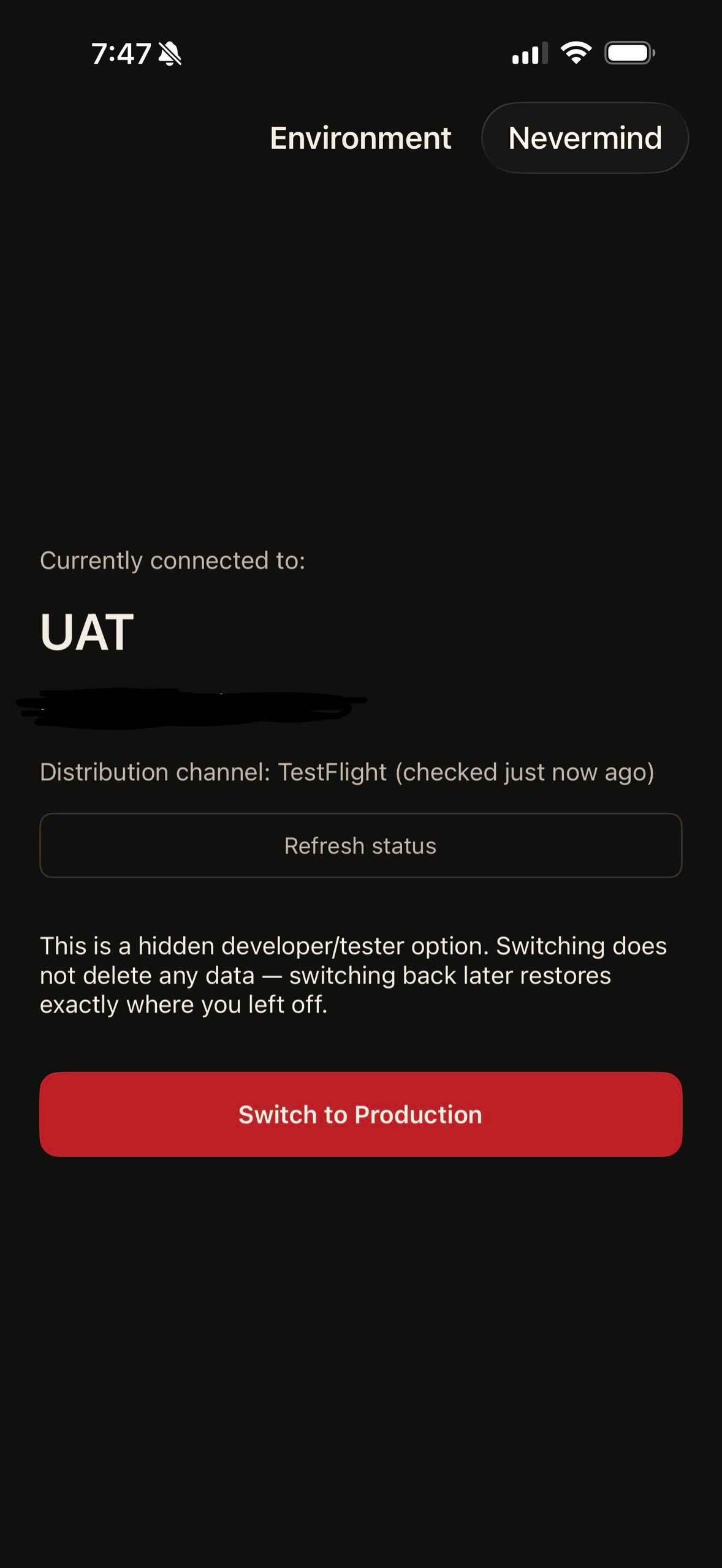
The confirmation screen states plainly which backend is active, shows what StoreKit detected for the distribution channel and when it last checked, and requires an explicit tap before anything actually switches, no accidental environment changes from a stray tap elsewhere in settings.
Once UAT is active, a persistent banner shows on every screen, authenticated or not. Production gets no banner at all. Relying on an icon color or a build number to signal “this is not the real thing” is not enough. A screenshot a tester shares in a bug report should make the active backend obvious at a glance, not something you have to ask about.
The Default Policy: Production Unless StoreKit Says Otherwise
Production is the default for every fresh install, with one deliberate exception: a fresh install auto-defaults to UAT if the app can tell it arrived through TestFlight. TestFlight builds always use StoreKit’s sandbox for purchases, no matter which backend the app talks to, so defaulting TestFlight installs to UAT keeps sandbox transactions flowing into the UAT database instead of quietly landing in production data.
That auto-default only fires once, on a fresh install with no prior explicit choice. Switch back to Production by hand, and the app respects that choice from then on. Android has no reliable way to detect its own distribution channel at runtime, so it skips the auto-default entirely and stays gesture-only. iOS has a real signal available, but reaching it turned out to be its own small project.
Auto-Detection Is Not Foolproof
Treat the TestFlight auto-default as a convenience, not a guarantee. I tested a fresh TestFlight install across three iOS devices, an iPhone 11 Pro Max, a 13 Pro Max, and a 17 Pro Max, all running iOS 26.6.1. Two of the three auto-detected TestFlight and switched to UAT as expected. The 13 Pro Max did not; it stayed on Production despite being a genuine TestFlight install, same build, same OS version, no explicit environment choice made beforehand.
Nothing in the app’s own switch logic distinguishes those cases. AppTransaction.shared either resolves to a verified sandbox environment or it does not, and the Swift bridge above already treats “not verified” and “threw an error” the same way: it completes with nil and the app falls back to whatever the default policy says, which is Production. A transient StoreKit verification failure looks, from the app’s side, identical to genuinely not being a TestFlight install. There is no retry and no second signal to cross-check against.
The practical fix is not a better detection mechanism, it is managing expectations. Tell testers up front, before they start filing bugs, to check the UAT banner right after install. If it is not there, that does not mean the app is broken; it means the device fell through to the default and needs the hidden gesture used manually. Baking that expectation into onboarding instructions for testers costs a sentence and saves a round trip of “why is my test data showing up in production.”
Asking StoreKit What Kind of Install This Is
StoreKit 2 exposes exactly the signal I needed: AppTransaction.shared, an async, cryptographically verified value whose environment property reports xcode, sandbox, or production. TestFlight installs report sandbox. The catch is that AppTransaction is a Swift-only API. It is not bound for direct C# calls the way most Objective-C-compatible StoreKit APIs are, so reading it from a MAUI app needs a small native bridge.
The bridge is a tiny Swift package with one @objc-visible class. Swift automatically generates an Objective-C-compatible completion-handler variant of an async function once it is @objc and uses only ObjC-bridgeable types, so a String? return value bridges cleanly to NSString?:
@objc(AppTransactionBridge)
public class AppTransactionBridge: NSObject {
    @objc public static func getEnvironment(completion: @escaping (String?) -> Void) {
        Task {
            guard #available(iOS 16.0, macOS 13.0, *) else {
                completion(nil)
                return
            }

            let result: VerificationResult<AppTransaction>
            do {
                result = try await AppTransaction.shared
            } catch {
                completion(nil)
                return
            }

            switch result {
            case .verified(let transaction):
                completion(transaction.environment.rawValue)
            case .unverified:
                completion(nil)
            }
        }
    }
}
That gets compiled into an .xcframework, bound through a small .NET-for-iOS binding project, and wrapped in a TaskCompletionSource on the C# side. I packaged the whole thing as its own open source NuGet package, SyntaxCircus.Maui.StoreKit, instead of burying it inside Gourd Alert, since the problem is generic to any MAUI app that needs this same signal. Apple’s own docs cover AppTransaction and its environment property if you want the full picture, along with the note that TestFlight always uses the sandbox environment.
Two Bugs Hiding in One Linker Error
The Swift compiled cleanly. The .xcframework built cleanly. Then a test app that referenced the binding failed at the very last step, with the app-level link:
error : Undefined symbols for architecture arm64:
error :   "_OBJC_CLASS_$_AppTransactionBridge", referenced from:
error :       <initial-undefines>
error : ld: symbol(s) not found for architecture arm64
Bug One: A Class Named the Same as Its Own Module
I had named both the Swift package and the class inside it AppTransactionBridge. Swift’s default Objective-C name-mangling scheme exists to avoid exactly that kind of collision across modules, so it silently exposed the class under a mangled runtime name instead of the plain one my C# binding expected. Running nm -g against the compiled static library confirmed it:
_OBJC_CLASS_$__TtC20AppTransactionBridge20AppTransactionBridge
Not _OBJC_CLASS_$_AppTransactionBridge, which is what the binding’s [BaseType(typeof(NSObject))] definition needed to find. The fix was one line: pin the Objective-C name explicitly with @objc(AppTransactionBridge), the annotation already shown in the snippet above. No compiler warning ever pointed at this. The Swift side built fine on its own; only the final app-level link exposed the mismatch.
Bug Two: A RuntimeIdentifier That Never Arrives
With the symbol fixed, the exact same error came back. A verbose build log showed the compiled library was never even reaching the linker. My first attempt at wiring up the native reference conditioned it on the target runtime identifier, one static library for the simulator and one for a real device:
<NativeReference Include="...\sim\libAppTransactionBridge.a"
                 Condition="$(RuntimeIdentifier.StartsWith('iossimulator'))">
That condition evaluates against the binding project’s own build, not the consuming app’s. A library project referenced through a ProjectReference does not inherit the app’s RuntimeIdentifier into its own property evaluation, so the condition silently never matched, in either direction, on any build. The fix was to stop conditioning on a value that was never going to arrive and reference the .xcframework directly instead, letting the app’s own final link step pick the right slice on its own:
<NativeReference Include="...\AppTransactionBridge.xcframework">
  <Kind>Static</Kind>
  <SmartLink>true</SmartLink>
</NativeReference>
That is exactly what an .xcframework is for. Once the library stopped trying to guess a value it could not see, everything linked and ran.
Other Ways to Detect Where a Build Came From
I have solved a version of this problem before, the harder way. An old Xamarin.iOS project of mine, Slot Shark, hit the same distribution-channel question years earlier and answered it with a remote config endpoint instead of a native shim. The mobile app called an AppVersionController on startup, passing its own build number and platform. The server looked up an exact match in a Postgres table and returned whether that specific build counted as production.
It worked, in the sense that it returned an answer. It also meant every new build needed a manual database row inserted before it shipped, or environment detection would fail outright. Eventually I got sick of babysitting that table for every release, so I just made the endpoint always return Production, full stop, and stopped calling it a variable at all. My changes at that point were small enough that it didn’t bite me in practice, but I knew what it was when I did it: a shortcut, and a cheat, not a fix.
That is the tradeoff a config endpoint buys you: a network round trip on every cold start, a database table to keep in sync with every release, and enough ongoing maintenance that it invites exactly the kind of corner-cutting I did. Reading AppTransaction locally skips all of that. The signal already exists on the device, verified by the operating system, with no server involved.
Android does not have an equivalent signal at all. PackageManager.getInstallSourceInfo() can tell you whether Google Play installed the app, but not which testing track it came from, so Gourd Alert treats Android as gesture-only by design rather than pretending to detect something it genuinely cannot.
A Server-Side Backstop, Because Client Signals Are Not Security
None of this, the gesture, the banner, or the StoreKit check, is a security boundary. A hidden gesture can be found, automated, or patched around in a client you do not control. The real enforcement lives on the server: purchase verification checks whether a transaction’s actual sandbox or production environment matches what is expected for the backend that received it, and rejects the mismatch instead of trusting whatever the client claims. RevenueCat’s own environment-strategies guide covers this pattern well if you are setting up something similar.
Revoking a compromised or abusive installation happens the same way it already does everywhere else in the app: server-side, independent of which backend the client thinks it is talking to.
Practical Takeaways
- App store review expects you to promote the same signed artifact. Build one binary that can point at either backend instead of shipping two separate builds.
- Namespace every piece of local state by environment, not just the auth token, or a “switch” just becomes a slower way to leak data between environments.
- On a platform with no cross-platform restart API, a coordinated re-bootstrap beats trying to track down and reset every singleton by hand.
- Not everything can rebootstrap in place. SDKs like Sentry or RevenueCat that read their configuration once at process start need a real restart, and since iOS won’t let the app trigger that itself, prompt the tester to manually close and reopen instead of pretending the switch fully completed.
- Treat a hidden gesture, a banner, or any client-reported distribution signal as a UX nudge, never a security boundary. Put the real enforcement on the server.
- If a trustworthy signal already exists on the device, like StoreKit’s
AppTransaction, reading it locally beats standing up a config endpoint and a database table just to answer the same question over the network. - Auto-detection is a best-effort convenience, not a guarantee, even with a verified on-device signal. Tell testers to check the banner after install and switch manually via the hidden gesture if it is not already on UAT.

0 comments on “One MAUI Binary, Two Backends: Switching UAT and Production (and Detecting TestFlight Along the Way)”